
How to Download Pre-filled JSON from incometax.gov.in — Step by Step
The fastest, most accurate way to import your complete tax data into TaxZen — zero manual entry
Last updated: July 2026 • 8 min read
Have your pre-filled JSON ready?
Upload it now → all data auto-imported in seconds
Table of Contents
1. What is the Pre-filled JSON?
The pre-filled JSON is a structured data file provided by the Income Tax Department that contains your complete verified tax data for the assessment year. It's the same data the portal uses internally to pre-populate your ITR form — but packaged as a downloadable .json file you can use offline.
What's inside the file:
- Salary income from your employer — sourced from Form 24Q filed by your company (gross salary, allowances, deductions under Section 16)
- All TDS credits — every TDS entry from Form 26AS (salary TDS, bank TDS, contractor TDS, rent TDS)
- Other income from AIS — dividends, savings account interest, FD interest, interest from securities, even amounts below TDS threshold
- Personal information — PAN, date of birth, full address, Aadhaar (masked), father's name, mobile, email
- Bank account details — pre-validated bank account for refund credit (account number, IFSC, bank name)
- Capital gains data — sale of securities, mutual fund redemptions, and property transactions reported by intermediaries
Key insight: The pre-filled JSON is essentially a superset of Form 16 + Form 26AS + AIS, all merged into one machine-readable file. It's the single most complete source of your tax data.
2. Why Use It Instead of Form 16 PDF?
Form 16 is what most people are familiar with, but it has significant limitations compared to the pre-filled JSON:
| Feature | Form 16 PDF | Pre-filled JSON |
|---|---|---|
| Accuracy | Depends on PDF parsing — can have OCR errors | 100% accurate — structured data, no parsing needed |
| Dividend income | ❌ Not included (even amounts below ₹5,000) | ✓ Included from AIS |
| Savings account interest | ❌ Not included (below ₹40,000 TDS threshold) | ✓ Included from AIS |
| FD interest | ❌ Not included | ✓ Included with TDS details |
| Bank account for refund | ❌ Not included | ✓ Pre-validated account included |
| DOB & father's name | ❌ Not included | ✓ Included |
| Multiple employers | Need separate Form 16 from each | ✓ All employers in one file |
| Capital gains | ❌ Not included | ✓ Reported transactions included |
Bottom line: Form 16 only covers salary from one employer. The pre-filled JSON covers everything — salary, other income, TDS, personal info, and bank account — in one file with zero parsing errors.
3. Step-by-Step Download from incometax.gov.in
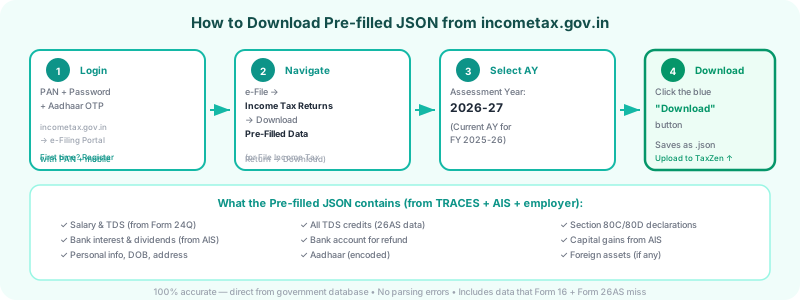
Follow these steps to download the pre-filled JSON from the income tax portal. You'll need your PAN + password and access to Aadhaar-linked mobile for OTP verification.
Login to incometax.gov.in
Go to https://www.incometax.gov.in → Click "Login" → Enter your PAN as User ID → Enter password → Complete Aadhaar OTP verification
Navigate to e-File section
Click e-File in the top menu → Select Income Tax Returns → Click File Income Tax Return
Select Assessment Year
Choose AY 2026-27 (for income earned in FY 2025-26) → Select filing type as "Original" (or "Revised" if re-filing)
Choose "Offline" filing mode
When asked "How do you want to file?", select "Prepare and Submit Offline" (not the online form)
Download Pre-filled JSON
Click the "Download Pre-filled Data" button (or link that says "Download Pre-filled JSON") → A .json file will download to your computer
Save the file
The file is typically named <PAN>_prefilled.json. Save it somewhere you can find it — you'll upload it to TaxZen next.
Alternative Path
Some users see the option under: e-File → Income Tax Returns → Download Pre-Filled Data (as a separate menu item). Both paths lead to the same file.
4. How to Use It in TaxZen
Once you have the pre-filled JSON file, importing it into TaxZen takes about 10 seconds:
Go to taxzen.co/file
Open TaxZen and navigate to the filing page
Choose the "Pre-filled JSON" tab
On the upload step, you'll see multiple upload options. Select the "Pre-filled JSON" tab (marked as recommended)
Upload the .json file
Click the upload area or drag-and-drop the .json file you downloaded from the portal
All data auto-imported
TaxZen instantly extracts: salary, TDS, personal info, other income (dividends, interest), bank account details, and capital gains. Zero manual entry needed.
💡 Why this is the recommended method: Unlike Form 16 PDF (which requires OCR parsing and can miss data), the pre-filled JSON is already structured. Every field maps directly — no ambiguity, no errors, no missing income sources.
5. What If Download Fails?
The income tax portal can be unreliable, especially during peak filing season (June–July). Here are common issues and fixes:
Portal under maintenance / slow loading
Try early morning (6–8 AM IST) or late night. Avoid weekday evenings when traffic peaks. The portal is typically stable on weekends.
Browser compatibility issues
Use Google Chrome (latest version). The portal has known issues with Safari and Firefox. Disable ad blockers and browser extensions that might interfere.
Session timeout before download
The portal sessions expire after ~15 minutes of inactivity. If you get a timeout error, login again and navigate directly to the download page.
AY 2026-27 not available yet
Pre-filled data depends on your employer filing the TDS return (Form 24Q). If your employer hasn't filed yet, the data won't be available. Typically available by late May / early June.
Empty or incomplete JSON
If the file downloads but has missing data (e.g., no salary), your employer's TDS filing may be delayed. Wait a week and try again, or check your Form 26AS to see if TDS is reflected.
Alternative: Use Form 16 PDF + Form 26AS
If you can't download the pre-filled JSON, TaxZen also supports: upload your Form 16 PDF (for salary data) + Form 26AS PDF (for TDS credits). You'll need to manually add other income like dividends and savings interest.
6. Pre-filled JSON vs AIS vs Form 26AS
Three documents from the portal, but very different in scope. Here's what each contains:
| Data Point | Pre-filled JSON | AIS | Form 26AS |
|---|---|---|---|
| Salary income | ✓ | ✓ | ✓ (TDS only) |
| TDS credits (all deductors) | ✓ | Partial | ✓ |
| Savings interest (below ₹40K) | ✓ | ✓ | ✗ |
| Dividends (below ₹5K) | ✓ | ✓ | ✗ |
| FD interest | ✓ | ✓ | ✓ (if TDS deducted) |
| Capital gains (reported) | ✓ | ✓ | ✗ |
| Personal info (DOB, address) | ✓ | ✗ | ✗ |
| Bank account (for refund) | ✓ | ✗ | ✗ |
| Father's name | ✓ | ✗ | ✗ |
| Machine-readable format | ✓ (JSON) | Encrypted PDF | PDF / Text |
| Rent received / property income | ✓ (if reported) | ✓ | ✗ |
Summary: The pre-filled JSON is the superset — it combines data from AIS and Form 26AS, adds personal info and bank details, and delivers it in a clean JSON format that's instantly usable. AIS has the most granular income detail but comes as an encrypted PDF. Form 26AS focuses on TDS but misses sub-threshold income.
Ready to file with your pre-filled JSON?
Upload your JSON → all data auto-imported → review & compute tax → generate ITR XML. Free, no account needed, 100% browser-based.
Upload Pre-filled JSON & File Free →Frequently Asked Questions
What is the pre-filled JSON file from incometax.gov.in?
Is the pre-filled JSON better than uploading Form 16 PDF?
When is the pre-filled JSON available for download?
Can I use the pre-filled JSON if I had multiple employers?
Is the downloaded JSON file encrypted?
Related Guides
🎓First-Time ITR Filing Guide
Who must file, documents needed, portal steps, e-verification
12 min read
🔄Multiple Form 16 / Job Switch Guide
Consolidate salary, TDS shortfall, e-Pay Tax, avoid 234B interest
12 min read
📈RSU / ESOP Filing Guide
Schedule CG, Schedule FA, SBI TT rate, 24-month holding period
12 min read
Disclaimer: This guide is for educational purposes only and does not constitute tax, legal, or financial advice. The income tax portal interface may change without notice. Screenshots and navigation steps are based on the portal as of July 2026. Always verify downloaded data against your actual documents before filing. TaxZen is an independent tool and is not affiliated with the Income Tax Department.