
How to File ITR for the First Time — Beginner's Guide 2026
A friendly, step-by-step walkthrough for first-time taxpayers filing their Income Tax Return for AY 2026-27
Last updated: July 2026 • 12 min read
File your first ITR with zero confusion
Upload Form 16 → TaxZen fills everything automatically. Free, no signup.
Table of Contents
1. Do I Need to File?
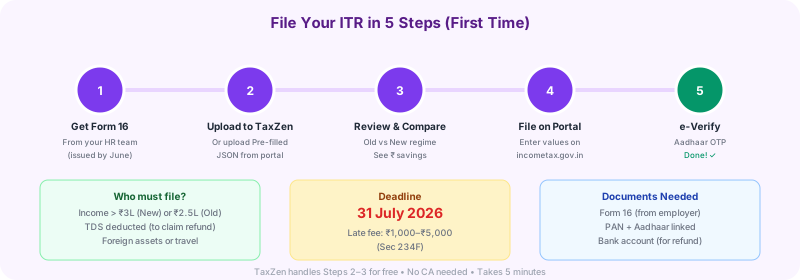
Not sure if you even need to file an ITR? Here are the situations where filing is mandatory:
- Gross income exceeds the basic exemption limit: ₹3,00,000 under the new tax regime (default from AY 2024-25) or ₹2,50,000 under the old regime
- TDS was deducted from your income and you want to claim a refund (even if your total income is below the limit)
- You hold foreign assets or have signing authority in a foreign bank account — filing is mandatory regardless of income
- You spent more than ₹2 lakh on foreign travel during the financial year
- Specified high-value transactions: deposited more than ₹1 Crore in savings accounts, paid more than ₹1 lakh in electricity bills, or incurred TDS/TCS above ₹25,000 (₹50,000 for senior citizens)
💡 Even if your tax is zero, filing is still recommended. An ITR acknowledgment (ITR-V) serves as proof of income for home loans, credit cards, visa applications, and claiming TDS refunds. Many banks won't process a loan without 2-3 years of filed ITRs.
2. Documents You Need
Gather these before you start. Having everything ready makes the process much smoother:
Form 16
Your employer provides this by 15 June every year. It contains your salary breakup, TDS deducted, and deductions claimed through the employer. This is the single most important document for salaried individuals.
PAN Card + Aadhaar Card
Both are mandatory. Your PAN must be linked to Aadhaar — if not linked, your PAN becomes inoperative and you cannot file. Check linking status at incometax.gov.in → Link Aadhaar Status.
Bank Account Details
Account number, IFSC code, and bank name. This is where your refund (if any) will be credited. Pre-validate your bank account on the e-filing portal for faster refunds.
Investment Proofs (for deductions)
If filing under the old regime: Section 80C proofs (PPF, ELSS, LIC, EPF), Section 80D (health insurance premium receipts), NPS contribution receipts (80CCD), and home loan interest certificate (Sec 24).
Rent Receipts (for HRA)
If you claim HRA exemption under the old regime and rent exceeds ₹1 lakh/year, you need your landlord's PAN. Keep monthly rent receipts with landlord name, address, and period.
New regime filers: Under the new tax regime (default), you don't need investment proofs or rent receipts since most deductions don't apply. You primarily need Form 16, PAN, Aadhaar, and bank details.
3. Which ITR Form to Use
Choosing the wrong form is a common reason returns get rejected. Here's the quick guide:
| Form | Who Should Use It | Key Conditions |
|---|---|---|
| ITR-1 (Sahaj) | Salaried individuals with simple income | Total income ≤ ₹50 lakh + salary/pension + one house property + other sources (interest, etc.) |
| ITR-2 | Capital gains, foreign assets, income > ₹50L | Sold shares/MFs, have foreign income or assets, salary above ₹50 lakh, multiple house properties |
| ITR-4 (Sugam) | Freelancers & small businesses (presumptive) | Business income under Sec 44AD/44ADA (presumptive taxation), turnover ≤ ₹2 Crore (business) or ≤ ₹75 lakh (profession) |
Most salaried freshers and first-time filers will use ITR-1 (Sahaj). If your only income is salary (up to ₹50 lakh), bank interest, and maybe one house property — ITR-1 is your form. It's the simplest and fastest to fill.
4. Step-by-Step Portal Filing
Here's how to file ITR-1 on the official income tax portal. Follow these steps carefully:
Step 1: Log in to the portal
Go to incometax.gov.in → Click "Login" → Enter your PAN as User ID → Set password if first time (you'll need Aadhaar OTP to register)
Step 2: Navigate to e-File
Dashboard → e-File → Income Tax Returns → File Income Tax Return
Step 3: Select Assessment Year
Choose AY 2026-27 (for income earned in FY 2025-26, i.e., April 2025 to March 2026)
Step 4: Choose filing mode
Select "Online" mode (recommended for first-timers — everything is done on the portal itself)
Step 5: Select ITR form
Choose ITR-1 if you meet the criteria from Section 3 above. The portal may also suggest the correct form.
Step 6: Pre-fill your data
Click "Let's pre-fill" or "Auto-fill". The portal pulls salary, TDS, and interest data from your employer and banks. This saves significant time.
Step 7: Verify pre-filled data
Cross-check salary and TDS with your Form 16. Verify Part B gross salary, deductions under Chapter VI-A, and total TDS. Fix any mismatches before proceeding.
Step 8: Add other income & deductions
Enter savings account interest (if not pre-filled), FD interest, and any deductions you want to claim (80C, 80D, etc. under old regime). Select your tax regime.
Step 9: Confirm tax computation
Review the tax summary. If refund is due, verify your bank account details. If tax is payable, you'll need to pay via e-File → e-Pay Tax on the portal before submitting.
Step 10: Submit & e-Verify
Click "Submit". You'll immediately be prompted to e-verify. Do it right away — see Section 5 below.
Pro tip: File well before the July 31 deadline. The portal slows down in the last week as millions try to file simultaneously. Early filing also means faster refund processing.
5. e-Verification (Within 30 Days)
Your ITR is not valid until you verify it. You must e-verify within 30 days of filing — otherwise it's treated as if you never filed.
Verification Methods (pick one)
✅ Aadhaar OTP — Easiest & Recommended
OTP sent to mobile number linked to your Aadhaar. Takes 30 seconds. This is what 90%+ filers use. Make sure your Aadhaar mobile number is current.
Net Banking
Log in to your bank's net banking → look for "Tax Filing" or "e-Verify" option → it redirects to the IT portal and verifies automatically. Available with most major banks (SBI, HDFC, ICICI, Axis, etc.)
Digital Signature Certificate (DSC)
For those who have a registered DSC. Less common for individual salaried filers — primarily used by companies and professionals.
⚠️ Critical: Your return is INVALID until verified
If you don't e-verify within 30 days, the Income Tax Department treats your return as "not filed". You'll have to file again. Always verify immediately after submission — it takes less than a minute via Aadhaar OTP.
6. After Filing
You've filed and verified — great! Here's what happens next:
- Check processing status: Log in → e-File → Income Tax Returns → View Filed Returns. Status will change from "Submitted" to "Processed" (usually within 15-45 days).
- Refund timeline: If you're due a refund, expect it within 30-45 days after processing. It's credited directly to your pre-validated bank account. You'll receive an email/SMS from CPC Bengaluru.
- Download & save ITR-V: The ITR Verification acknowledgment (ITR-V) is your proof of filing. Download and keep it safe — banks and visa offices often ask for it.
- Revised return if needed: Made a mistake? You can file a revised return (Section 139(5)) until 31 December 2026 for AY 2026-27. Select "Revised Return" and enter the original filing acknowledgment number.
- Intimation under Section 143(1): After processing, you'll receive an intimation comparing your filed figures with the department's records. If there's a mismatch, you may need to respond or file a revised return.
Refund not received? Check "Refund Status" on the portal. Common blockers: incorrect bank account, bank account not pre-validated, or name mismatch between PAN and bank account.
7. Common First-Timer Mistakes
Avoid these pitfalls that trip up most beginners:
Not e-verifying after filing
The #1 mistake. Many people think clicking "Submit" is enough. Without e-verification within 30 days, your return is legally void. Verify immediately via Aadhaar OTP.
Wrong bank account for refund
Entering an incorrect account number or a non-pre-validated account means your refund bounces. Pre-validate your bank account on the portal before filing.
Ignoring other income sources
FD interest, savings account interest (above ₹10,000), freelance income, and gifts above ₹50,000 are all taxable. The IT department can see these via AIS/TIS — don't skip them.
Not linking PAN with Aadhaar
If PAN-Aadhaar isn't linked, your PAN becomes inoperative. You can't file, claim refunds, or even open a bank account. Link them at incometax.gov.in (₹1,000 late fee applies).
Filing the wrong ITR form
Filing ITR-1 when you have capital gains, foreign income, or salary above ₹50L leads to a defective return notice. The portal will ask you to correct it within 15 days.
Not checking AIS/TIS before filing
Your Annual Information Statement (AIS) shows everything the department knows about your income. If you file less than what's in AIS, expect a notice. Always reconcile first.
Missing the July 31 deadline
Late filing attracts a penalty of ₹5,000 (₹1,000 if income ≤ ₹5L) under Section 234F. You also lose the ability to carry forward losses and may face interest under Sec 234A.
Ready to file your first ITR?
Upload your Form 16 and TaxZen fills in your salary, TDS, and deductions automatically. Just review and you're done. Free, private, no account needed.
File My First ITR Free →Frequently Asked Questions
Is ITR filing mandatory if my salary is below ₹5 lakh?
What happens if I don't e-verify my ITR?
How long does it take to get a TDS refund?
What is the penalty for filing ITR after July 31?
Do I need a CA to file my ITR?
Related Guides
📥How to Download Pre-filled JSON
Step-by-step portal download, why it beats Form 16 PDF
8 min read
🔄Multiple Form 16 / Job Switch Guide
Consolidate salary, TDS shortfall, e-Pay Tax, avoid 234B interest
12 min read
📈RSU / ESOP Filing Guide
Schedule CG, Schedule FA, SBI TT rate, 24-month holding period
12 min read
Disclaimer: This guide is for educational purposes only and does not constitute tax, legal, or financial advice. Income tax rules are subject to change — always verify current provisions on incometax.gov.in or consult a qualified Chartered Accountant before filing. Information is based on the Income Tax Act as applicable for AY 2026-27.